
The LONGER Ray5 laser engraver provides an easy way to create personalized designs and practical projects with high precision. Depending on the material and settings, Ray5 can perform different types of laser processing, including engraving, carving, and cutting.
Different materials support different processing methods. For example, wood can be used for engraving, carving, and cutting, making it one of the most popular materials for laser projects.
In this article, we will explore the main applications of LONGER Ray5 and show how users can create unique DIY projects with laser engraving technology.
Laser Engraving Applications
Laser engraving is one of the most common applications of the LONGER Ray5. It allows users to add text, images, and patterns to different surfaces. Common engraving projects include:
- Personalized greeting cards
- Pet name tags
- Photo engraving
- Decorative designs on ceramic or stone
Engraving is usually the easiest laser processing method to start with. For some challenging materials, such as metal or ceramics, users can temporarily apply a black coating to improve engraving visibility. After engraving, the coating can be removed from the surface.

Laser Carving Applications
Laser carving removes part of the material surface to create a deeper design. Compared with standard engraving, carving creates a texture that can be seen and felt.
Wood is one of the most commonly used materials for laser carving. The engraving depth can range from a small surface mark to several millimeters, depending on the settings.
To achieve good carving results, users need to adjust laser parameters carefully. The correct combination of speed and power helps create clear details while avoiding excessive burning or unwanted cutting.

Laser Cutting Applications
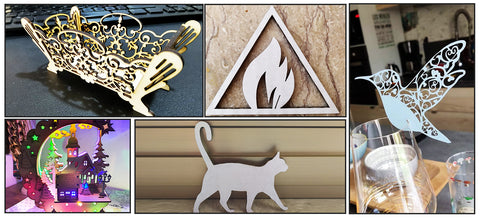
Laser cutting allows users to create separate parts and build three-dimensional projects. With suitable settings, Ray5 can cut materials such as: wood, paper, cardboard, leather, acrylic.
Laser cutting can be used to create: Nameplates, greeting cards, puzzles and 3D models. For 3D projects, users can cut multiple pieces from plywood with the same thickness and assemble them manually to create complete models.
Find More Laser Project Ideas and Design Resources
The LONGER Ray5 can be used for many creative projects. The final result depends on your design ideas, material selection, and laser settings.
If you need inspiration or ready-to-use designs, many online platforms provide image files and templates for laser engraving and cutting projects. Popular resources include:
- 3axis.co(Cutting)
- Laser Ready Templates(Engraving & Cutting)
- Etsy(Engraving & Cutting)
- Thingiverse(Engraving, Cutting)
- Laser Library(Cutting)
- Free Patterns Area(Engraving & Cutting)
- Ponoko(Cutting)
- So Fontsy(Engraving & Cutting)
- Boxes.py(Cutting)
- Vecteezy(Engraving & Cutting)
- Maker Union(Engraving & Cutting)
- The Hungry Jpeg(Engraving & Cutting)
Conclusion
The LONGER Ray5 laser engraver provides flexible options for both beginners and experienced creators. From simple personalized engraving to detailed carving and creative laser cutting projects, Ray5 helps users turn digital designs into real objects.
By choosing the right material and adjusting laser settings properly, users can explore a wide range of DIY possibilities and create unique projects with their own ideas.
Share:
LONGER How To: Adjust the Longer Nano Extension Rod for a 300mm Engraving Range
Lens Cleaning for Longer Ray5 10W