Tutorial de productos

Aprende a sacar el máximo partido a tus máquinas LARGER con útiles tutoriales y consejos.

LONGER How To:Adjust the Red Dot Focusing Module on the Nano Duo

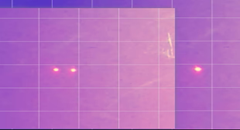
The red dot focusing module on the Longer Nano Duo helps users quickly align the laser’s focal point for precise engraving. If the red dots become misaligned due to movement or impact, it’s essential to recalibrate the system. This guide covers how to find the correct focal distance (220.5mm), activate the red dot in both the device screen and LaserBurn software, and manually align the dual red lasers using simple tools. Proper adjustment ensures high engraving precision and reduces errors caused by focus issues.

Leer más

LONGER How To: Make a Custom Rubber Stamp with the Ray5 10W Laser Engraver

Esta guía muestra cómo crear un sello de goma personalizado con la grabadora láser LONGER Ray5 de 10 W y madera de tilo de 3 mm. Desde el diseño de texto e iconos curvos en LightBurn hasta el grabado y el corte con ajustes láser optimizados, el proceso es sencillo y divertido. Al reflejar el diseño y garantizar un grabado profundo, se pueden crear sellos de alta calidad, ideales para manualidades, embalaje y personalización de marcas. Un excelente proyecto de bricolaje para demostrar creatividad y precisión con tecnología láser.

Leer más

LONGER How To:Install the latest 30W Laser Module for Longer Ray5

The Longer Ray5 laser engraver now supports a powerful 30W laser module, expanding its capabilities for cutting and engraving a wider range of materials more efficiently. This guide provides step-by-step instructions for installing the 30W module, including hardware adjustments, cable connections, and firmware updates. With the upgrade complete, users can enjoy faster processing times and greater creative freedom for their laser projects. Be sure to refer to the included manual and this guide to ensure a smooth installation.

Leer más

LONGER How To: How to Add and Use the Art Library in LightBurn

The Art Library in LightBurn is a powerful feature that lets users store, organize, and instantly reuse commonly used vector graphics. This guide walks you through enabling the library window, creating and saving custom libraries, importing artwork, and inserting graphics into projects. Perfect for Longer laser engraver users, the Art Library boosts productivity by keeping your favorite designs organized and ready to use—whether you're crafting gifts, running a small business, or working on personal engraving projects.

Leer más

Cómo instalar y configurar el nuevo Longer Ray5 Mini

Esta guía de configuración acompaña a los principiantes en la instalación rápida y sencilla de la Longer Ray5 Mini, una grabadora láser compacta y portátil con opciones de 2,5 W o 3,5 W. Ideal para quienes se inician en el uso de láseres, la máquina viene prácticamente preensamblada. El tutorial abarca la instalación del módulo láser, la comprobación de cables, el ajuste de ejes, la configuración de la alimentación, la alineación del enfoque y la configuración de LightBurn. En tan solo unos sencillos pasos, estará listo para comenzar a grabar proyectos creativos en casa o donde quiera que esté.

Leer más

LONGER How To:Enable Rotary Mode in LightBurn

This guide explains how to enable and configure Rotary Mode in LightBurn for engraving on cylindrical or symmetrical items using roller or chuck rotary attachments. From hardware connection to setting parameters like steps per rotation and object diameter, you'll learn everything needed for accurate rotary engraving. The tutorial includes tips for mirror output, axis selection, and test engraving to ensure optimal results. Perfect for makers using the LONGER Ray5 or similar laser engravers with rotary tools.

Leer más

How to make an object positioning grid for Longer Nano & Longer Nano Pro

The Longer Nano and Nano Pro offer precision engraving via Galvo technology, but due to manual calibration, users may find the laser misaligned with the machine’s metal base. This guide walks you through creating a custom object positioning grid using plywood and LightBurn to ensure perfect alignment with the laser head. The engraved grid provides a consistent reference point for placing materials like business cards, improving accuracy, repeatability, and reducing material waste. Just be sure not to move the plywood after engraving, as it serves as the fixed alignment guide.

Leer más

LONGER How To:Use Overcut in LightBurn for Laser Cutting

Overcut is a practical feature in LightBurn that slightly extends the laser cut path beyond the endpoint, ensuring complete separation and cleaner edges. This guide explains what Overcut does, why it matters—especially for thicker materials—and how to set it up effectively in LightBurn’s Cut Settings Editor. With step-by-step instructions and practical tips, you’ll be able to enhance the quality and precision of your laser cutting projects with ease.

Leer más

Más extenso: Cómo hacer: Desplazar formas en LightBurn

La herramienta Formas Desplazadas de LightBurn permite generar nuevas formas a distancias fijas de las existentes, lo que la hace ideal para crear bordes, líneas de corte y efectos de capas. Esta guía abarca desde el acceso a la herramienta hasta la configuración de la distancia, la dirección y los estilos de esquina del desplazamiento. También aprenderá sobre opciones avanzadas como la simplificación de resultados y la selección automática de nuevas formas. Tanto si graba texto como si diseña intrincados gráficos vectoriales, dominar la función de desplazamiento garantiza una mayor precisión y flexibilidad de diseño con su grabadora láser Longer.

Leer más